Oracle iProcurement
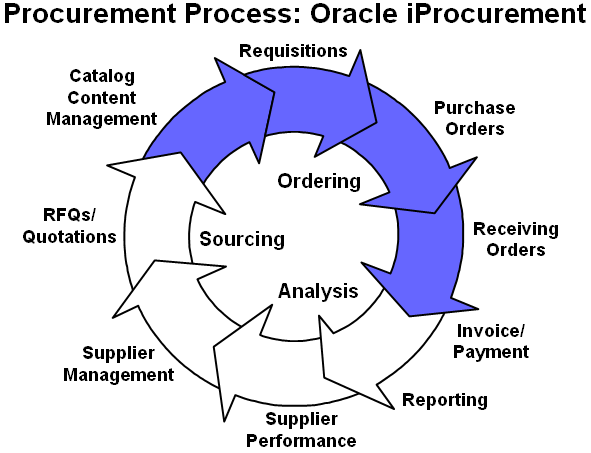
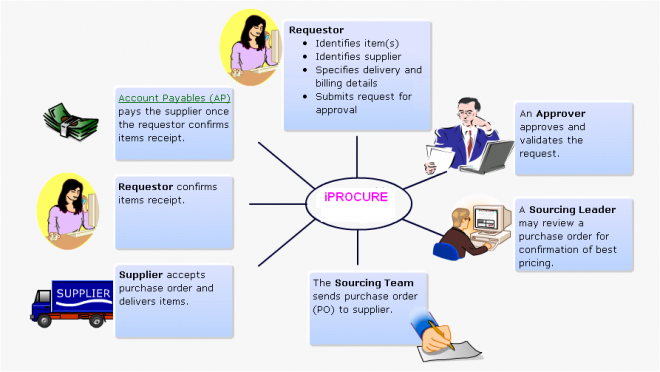
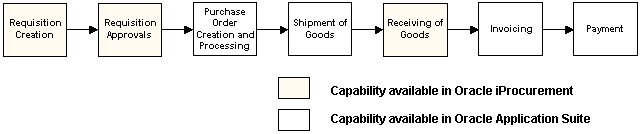
The Oracle iProcurement functionality provides the essentials for the ordering portion of the procurement process. This includes catalog content management, requisitioning, purchase order creation, and receiving orders.
Oracle iProcurement 11i enables internal corporate requesters to independently order items from both local (internal) and remote (external) catalogs. Oracle iProcurement 11i is fully integrated with Oracle Applications Release 11i.
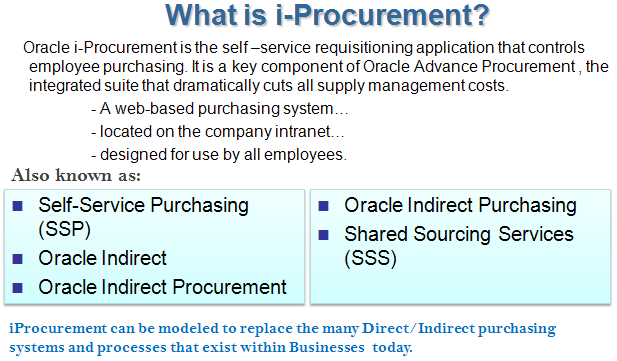
Oracle iProcurement is part of Oracle Applications, an integrated suite of E-Business solutions designed to transform your business into an E-Business. Along with the rest of the Oracle E-Business suite, iProcurement helps an enterprise streamline the procurement process with end-to-end business automation. It is the starting point for the ordering process and provides powerful self-service requisitioning capability with an intuitive, web shopping interface. It constitutes a key component of the complete procure-to-pay business flow and helps an enterprise to process and manage requisitions and receipt of the requested goods/services in an efficient and automated manner.
 Indirect & Direct Indirect sourcing is:
 The purchase or procurement of any goods or services that are not directly related to/included in the manufacture of any of our primary products
Examples include (but are not limited to): Office supplies, Advertising, Training & Tools etc.
Direct sourcing is:
The purchase or procurement of any goods or services that are directly related to/included in the manufacture of any of our primary products
Examples include (but are not limited to): Standard Inventory Item (Laptop), Manufacturing Item (Car)
iProcurement should be used for the purchase of ALL goods and services
Why are we switching to iProcurement?
Simplicity : There are several different ways to acquire indirect materials right now, each with its own rules
Cost Savings: Transactional costs are reduced by lowering the number of touches a requisition experiences eBusiness Direction All Businesses have implemented/are implementing Oracle Purchasing systems
- Ability to buy administrative items
- Ability to buy production items
- Self-guiding catalog
- Desktop receiving
- Single global instance
- Punchout to other exchanges
- Integration with enterprise resource planning (ERP) system
Catalog Management
Oracle iProcurement uses stores and catalogs to organize items for requesters.
What Are Catalogs?
A catalog is a cohesive source of supplier product and service information that provides a means by which the information can be found quickly by the requestor.
Attributes of a good catalog are:
- Content (product categories)
- Accuracy (product descriptions)
- Robustness (availability)
- Ease of use (good indexing, searching)
Why Use Catalogs?
An internet-based procurement solution is only effective if the user can reliably order the items they need. Poor catalog management leads to:- Contract leakage
- Maverick buying
- Workarounds
- Decreased spend control
Each store contains one or more catalogs of items. When requesters search, Oracle iProcurement searches across all catalogs in the store and displays the results. (You search one store at a time.).Grouping similar catalogs into a single store provides the following benefits:- Provides logical groupings. In some cases, requesters may understand store groupings better than categories, which may be too technical or granular for requesters.
- Produces more relevant search results. For example, searching for battery can return AAA battery, industrial battery, and notebook computer battery. If, however, each battery is in a separate catalog and you segment the catalogs by store, the notebook computer battery can belong to a Computer Supplies store. Searching for a battery in the Computer Supplies store returns only computer batteries.
Types of CatalogsOracle iProcurement supports the following types of catalogs:
■ Local catalog (also known as the base catalog - extractor & bulk loader)
■ Punchout catalog hosted by a supplier or marketplace
■ Transparent punchout catalog hosted by a supplier or marketplace
■ Informational catalog
Local Catalog
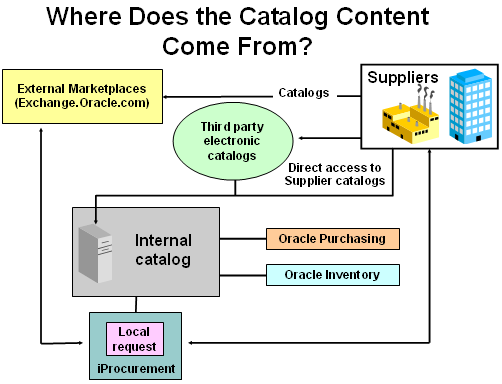
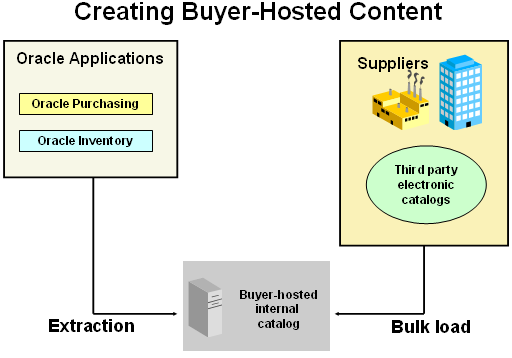
There are two sources for data residing in the local catalog. One of these sources is your internal procurement system. Using the catalog extractor, data from purchasing documents such as blanket purchase agreements and requisition templates can be made available to requesters in Oracle iProcurement. The other source for local content is data loaded directly into Oracle iProcurement through the catalog bulk loader. This data may have originated from a supplier or third-party content management service, downloaded from Exchange.Oracle.com, or created internally.
Punchout Catalog Hosted by Supplier or Marketplace
While creating a requisition, requesters can punch out directly to an Oracle Exchange marketplace, such as Exchange.Oracle.com, or to a supplier's Web store (to access supplier-hosted catalogs). After selecting items for purchase, requesters return to Oracle iProcurement to add additional items to their cart and check out as they normally do. For more information on setting up punchout, see the Punchout and Transparent Punchout Guide for Oracle iProcurement and Oracle Exchange.
Transparent Punchout Catalog Hosted by Supplier or Marketplace
A transparent punchout catalog (also known as a distributed search) allows requesters to search for items on an external site without leaving Oracle iProcurement. Unlike punchout, requesters do not access the site directly. Instead, when the requester searches for items, the transparent punchout works in the background to access the remote catalog and returns the matching items directly to the search results in Oracle iProcurement. Requesters do not necessarily know the items came from an external site. From the Search Results page, requesters add the items returned from the transparent punchout to their shopping cart and check out as they normally do. From Oracle iProcurement, you can set up a transparent punchout to a supplier site or to an Oracle Exchange marketplace, such as Exchange.Oracle.com.
Informational Catalog
An informational catalog enables you to provide to requesters instructions or links for ordering items or services that may not fit into the other catalog types. For example, your company may already have internal Web pages containing purchasing information for employees. You can use the informational catalog as the starting point for accessing those pages. The informational catalog enables Oracle iProcurement to be your company’s portal for all ordering.
Creating and Maintaining Local Content
Buyer-hosted catalogs are hosted, as the name suggests, by the purchasing organization. A single catalog is built with product and services information from multiple suppliers. It is used by all purchasing staff and has a common user interface, no matter which supplier the product or service is ultimately obtained from.
Buyer-Hosted catalogs are:
- Singular (one catalog fits all)
- Unified (consistent look and feel)
- Supplier independent (contains selected products and services from more than one supplier)
Suggested Commodities
Direct material: mass-produced mechanical parts; products with pre-negotiated or stable prices; strategic maintenance, repair, and operation (MRO) items (such as packing material).
Indirect material: office supplies; standard MRO items; products with unstable pricing. Before Extracting or Bulk Loading Content
It you are extracting categories from Oracle Purchasing, keep in mind that the existing category structure will be reproduced in the Oracle iProcurement catalog. This also means that this is an opportunity to create a multi-tiered structure before extraction.
If you are going to create a category structure in Oracle iProcurement, you’ll need to create or load these categories using schema editing or bulk loading, and then map these categories to Oracle Purchasing categories.
Think first about how you want the catalog to look and be structured: - Will you use only extracted items and categories?
- Will you use only bulk loading?
- Will you use both methods?
- Are the categories you extract sufficient, or do you want to create a different category structure for iProcurement users?
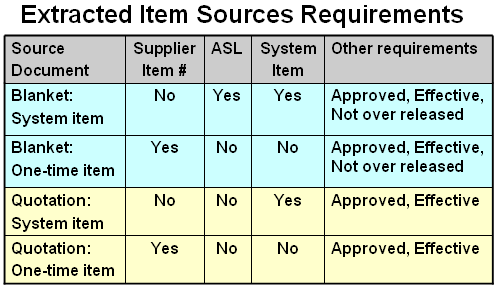
Extracted Item Sources RequirementsTo extract items from Oracle Purchasing documents certain conditions must be met. First and foremost is that the item must belong to a Web enabled Purchasing category set. Then the conditions indicated in the table above must be met.
Source Document
This is the Oracle Purchasing document type. Blanket indicates a blanket purchase agreement. Quotation indicates an existing Oracle Purchasing quotation.
ASL
ASL stands for Approved Supplier List. If indicated in the above table, the item must be included in an active ASL.
Supplier Item #
Indicates that a supplier item number must exist in the Oracle Purchasing document.
System Item
Indicates that the item must be correctly set up as a purchasing item in Oracle Purchasing or Oracle Inventory as a master item that is enabled for the operating unit you are extracting.
Other requirements
This column in the table identifies other requirements that must be met for the Oracle Purchasing document to be considered for item extract. Typically these are that the document must be approved, the document’s effectivity dates must indicate that it is active, and that the document amount limit has not been exceeded.
Oracle Purchasing Contract Agreements
Not listed in the table, but very much a part of the ordering process are contract agreements. They have no items and therefore are not considered during extraction. However the still have requirements that must be met to be used for automatic sourcing. Similar to blanket agreements, they must be approved, the document’s effectivity dates must indicate that it is active, and that the document amount limit must not be exceeded.
Implementation Considerations
The extraction criteria for each of the following data elements is explained in further detail below:
■ Purchasing categories
■ Blanket purchase agreements
■ Global agreements (blanket purchase agreements for which Global is selected)
■ Catalog quotations
■ Requisition templates
■ Approved supplier list (ASL) entries
■ Items from the item master file, including internally orderable items
The extractor does not extract outside processing items.
If the extracted items include updates to items that requesters have placed on favorites lists, the favorites lists are also updated. (Saved carts are not updated, but upon checkout, Oracle iProcurement will alert the requester to items that no longer exist or are no longer valid.)
The item data that is extracted is as follows: supplier, supplier site, category, item number, item description, unit of measure (UOM), price, currency, supplier item Creating and Maintaining Local Content number, attribute 13 (for images, if any, on blanket purchase agreements or catalog quotations), and attribute 14 (for image URLs, if any, on blanket purchase
agreements or catalog quotations). If extracting requisition templates, the requisition template name is also extracted and displayed as a public shopping list.
If extracting items from agreements or quotations, the agreement or quotation number is also extracted; the number displays to the requester if it is set up to display using schema editing.
Purchasing Categories For categories to be extracted into the Oracle iProcurement catalog, the following requirements must be satisfied:
■ The category belongs to the Purchasing Category set.
■ The category is Enabled for iProcurement in the Categories window.
■ The category is active.
Oracle iProcurement extracts the category description, such as Computers and Monitors, and displays that as the category name in Oracle iProcurement. If there is no category description, it extracts the category code, such as IT.COMPUTER, and makes that the category name.
Blanket Purchase Agreements Items on blanket purchase agreements appear in the Oracle iProcurement catalog if the following conditions are met:
■ The blanket purchase agreement is approved and valid (not canceled, closed, finally closed, or frozen).
■ The blanket purchase agreement header and line are active. (Their effective dates include today.)
■ The item belongs to a purchasing category that satisfies the requirements stated in the Purchasing Categories section. The category has been extracted.
Global Agreements Items on global agreements appear in the Oracle iProcurement catalog if the following conditions are met:
■ The global agreement meets the same requirements as given for blanket purchase agreements, above.
■ Since global agreements are created in one operating unit and assigned to others, the following conditions must also be met to ensure that the global agreement is valid in its assigned operating units:
- The supplier site for the item on the global agreement is an active Purchasing site in the assigned operating unit.
- If the item on the global agreement is a master item, the item is defined in the financial system parameters (FSP) organization for the assigned operating unit and is purchaseable in the FSP organization. The FSP organization is the inventory organization specified in the Supplier-Purchasing tabbed region of the Financial Options window. Each operating unit has an FSP organization that contains a bank of valid items for that operating unit. If an item on a global agreement exists in the FSP organization in the operating unit in which the agreement was created but not in the assigned operating unit, then the item is not extracted from the assigned operating unit.
- If the item on the global agreement is a master item, the UOM class used on the agreement must match the UOM class defined for the master item. If the currency on the global agreement differs from the requester’s functional currency, the rate type from the Purchasing Options (for the requester’s operating unit) and the extraction date are used to perform the currency conversion.
Bulk Loading Catalog Data
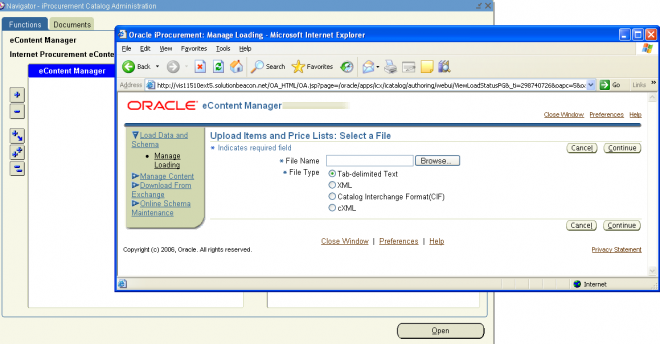
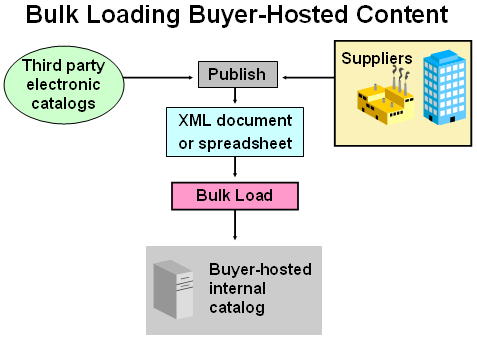
Bulk Load: XML or spreadsheet (tab-delimited text) file that supplier creates and buyer uploads using the eContent Manager.
You can use either extraction or bulk loading, or both methods, to maintain buyer-hosted content. For example, bulk-loaded items can augment items already extracted into the iProcurement catalog.
- You can bulk load items in addition to items you’ve extracted.
- You can modify extracted items using your bulk load file. Basically, bulk loading lets you specify more information about items than the item master or other sources may allow.
-
The Oracle iProcurement catalog supports the bulk loading of catalog data. Catalog data consists of the items and services available for purchase as well as the associated prices for these goods.
Catalog data may have originated from any of the following sources:
■ Downloaded from an Oracle Exchange marketplace, such as Exchange.Oracle.com.
■ Obtained directly from a supplier.
■ Obtained from a third-party catalog provider.
■ Created internally.
The bulk loader supports item catalogs created in the following formats:
■ Tab-delimited text file (spreadsheet)
■ XML
■ Catalog Interchange Format (CIF)
■ cXML (commerce eXtensible Markup Language, which is based on the XML language)
The catalog bulk loader also supports the creation of catalog schema using XML files. The catalog schema consists of a combination of categories, local descriptors used to describe items in a specific category, and base descriptors used to describe any item or service in the catalog.
Setting Up Contract AutoSourcing
Oracle iProcurement supports the association of a requisition line with a contract purchase agreement defined in Oracle Purchasing. This allows the automatic creation of standard purchase orders through the use of the PO Create Documents workflow. The standard purchase order that is created stores the contract number in the Purchase Orders window, in the Reference Documents tabbed region, in the Contract field. Oracle Purchasing adds the total amount of the purchase order line to the Released amount on the contract purchase agreement.
Associating a requisition line with a contract purchase agreement can be done in two basic ways, automatic or explicit.
Automatic Contract Sourcing If the PO Create Documents workflow option "Should Contract be used to autocreate the Doc?" is set to Yes, Oracle iProcurement checks whether there is a valid contract purchase agreement for the supplier and
supplier site specified on the requisition. If there is, that contract is used. If multiple contracts exist for the supplier and supplier site, the latest created contract is used.
Automatic contract sourcing can be used for the following types of items:
■ Bulk loaded, punchout, or transparent punchout catalog items where there exists a valid contract purchase agreement for the same supplier and supplier site associated with the item.
■ Non-catalog requested items where there exists a valid contract purchase agreement for the same supplier and supplier site associated with the item.
■ Extracted ASLs that are not linked to a source document and where there exists a valid contract purchase agreement for the supplier and supplier site specified on the ASL.
Explicit Contract Sourcing You can also explicitly enter a contract purchase agreement for an item in the catalog.
Explicit contract auto-sourcing can be used for the following types of items:
■ Bulk loaded items that have an explicit reference to a contract purchase agreement in Oracle Purchasing.
■ XML punchout or transparent punchout items for which the supplier hosting the content has specified a contract purchase agreement number that is valid in Oracle Purchasing.
■ XML punchout or transparent punchout items from an Oracle Exchange marketplace where the buying company has specified on a supplier price list a valid contract purchase agreement number in Oracle Purchasing.
If a specific, valid contract purchase agreement number is given for an item, the PO Create Documents workflow references that contract purchase agreement on the purchase order, even if other valid contract purchase agreements exist for the
supplier and supplier site.
Overview of iProc
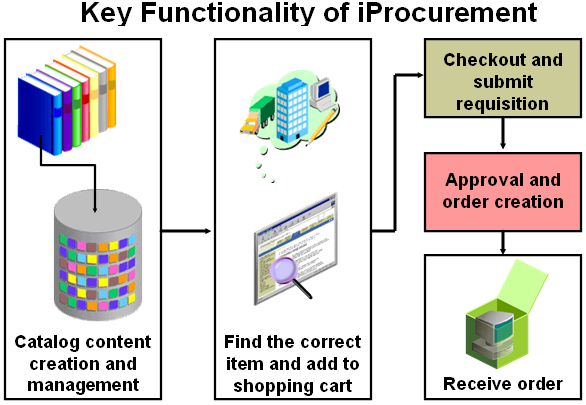
■ Catalog and Content Management
■ Shopping
■ Checkout and submit requisition
■ Approval and Order creation(Requisition Tracking and Management)
■ Desktop Receiving
Catalog and Content Management
Oracle iProcurement 11i offers a flexible solution to catalog and content management, enabling you to select from several approaches based on your business model.
1. Load catalogs directly into the Oracle iProcurement catalog using the catalog bulk loader, which supports catalogs formatted in XML, standard text, catalog interchange format (CIF), or cXML. Using the catalog bulk loader, you can load
new catalogs, update existing catalogs, and delete catalog content. Oracle iProcurement 11i also supports catalogs created in multiple languages and currencies to support requester communities worldwide, respecting their cultural backgrounds.
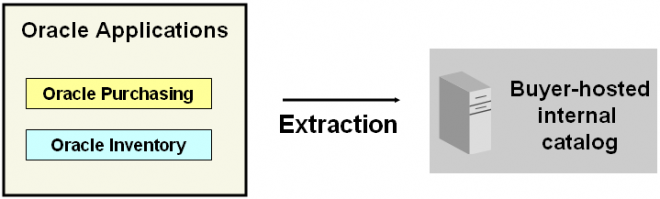
2. Use the catalog extractor to load items and services from Oracle Purchasing into the iProcurement catalog.
3. Punchout to an Oracle Exchange marketplace, such as Exchange.Oracle.com, or a supplier's Web store to access their catalogs. This punchout can be a direct link to the store, where the requester searches, shops, and returns items to
Oracle iProcurement. Alternatively, you and the supplier can set up a transparent punchout that works in the background to return matching items from the external site directly to the requester’s search results.
4. Use informational catalogs, which contain instructions or links for ordering other items or services at your company. The informational catalog enables Oracle iProcurement to be your company’s portal for all ordering.
Shopping
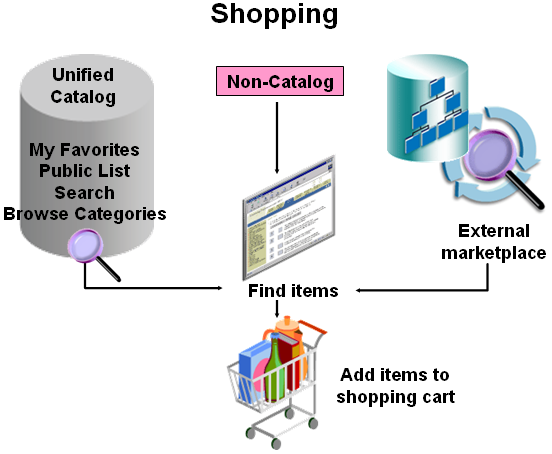
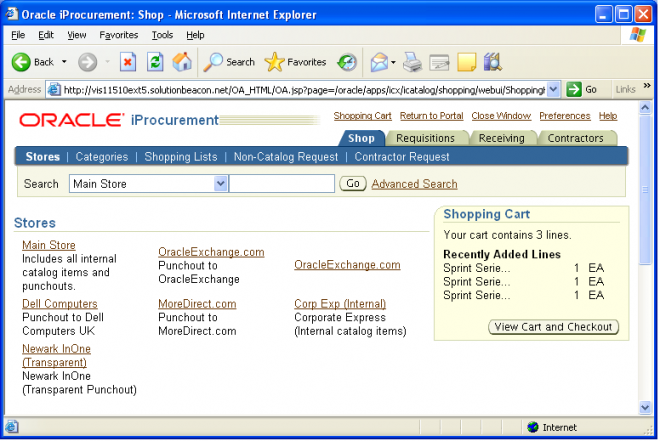
Oracle iProcurement employs the concept of stores. Using stores, organizations can define an intuitive collection of their content areas. Stores can be configured to include any combination of local catalogs, punchout catalogs, information catalogs and transparent punchout catalogs.
For most organizations, restricting access to content by role is very important. After configuring catalogs and stores, administrators can easily control which are available to different classes of requesters within the employee population.
Internally Sourced Items
In a buying organization, goods are sourced either from external suppliers or from internal inventory and warehouse locations. In Oracle iProcurement, externally sourced items are requested using purchase requisitions and items sourced from an internal source are requested using internal requisitions. Internal requisitions are not converted into purchasing documents (purchase orders. blanket releases, and so forth). Rather, internal requisitions are converted into internal sales orders. These internal sales orders are subsequently processed and then the requested items can be received in Oracle iProcurement.
Checkout
Once items have been added to the cart, requesters have three options to complete the requisition process. Regardless of the checkout option selected, at the end of each checkout a requisition is submitted.
Delivery -Multiple Destination Types
You can use Oracle iProcurement 11i to create requisitions for requester-initiated inventory replenishment requests, such as stocking a shop floor crib. Alternatively, requested items can be delivered to an expense destination.
One Time Addresses
There are occasions where requesters want items delivered to a location that is not an office location or other pre-defined location established in the database. This is considered a one time address and can be defined as a deliver to location during the requisition creation process.
Integration to EAM
Oracle Enterprise Asset Management (EAM) is an Oracle Applications module that identifies, schedules and tracks all work activity/costs related to assets throughout an organization. Oracle iProcurement requisitions update EAM work orders.
Multiple Account Distributions and Account Generation Workflow Integration
Charge accounts for requisition lines are generated using Account Generator Workflow rules. You can split charges for requested items across multiple accounting codes, allowing multiple departments or account to bear the cost of items on a single requisition line. This eliminates the need to create multiple requisition lines when the same item is being requested for multiple departments.
Encumbrance Support
For customers using budgetary controls, Oracle iProcurement provides the ability to check funds on–line before submitting requisitions. If a request carries costs past their budgetary limit, the requester is informed and can take appropriate action.
Funds are automatically reserved during the requisition submit process.
Requisition Tracking and Management
After the requester has created and submitted a requisition, the requester can quickly and easily track further processing of the requisition using the Oracle iProcurement application.
Requisition Tracking
The requester receives real-time notifications to keep the requester up-to-date with actions taken against the requisition. Requesters can optionally launch enhanced queries to gain additional intelligence and insight into the progress of their
requisitions.
Requisition Management
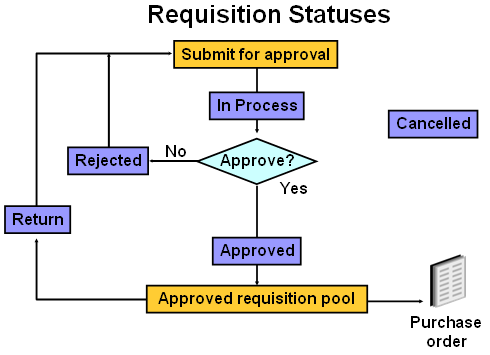
If there are changes to be made to an existing requisition, the requester has the capability to withdraw the requisition, make the necessary changes and resubmit it, or if the original request for the goods/services is no longer valid, the requester can simply cancel the original requisition. Requesters can also submit a request for changes to the purchase order created from their requisitions.
Requisition Approval Routing
Oracle iProcurement provides flexibility in streamlining the approval process:
■ Vacation Scheduling: Approvers can indicate dates of planned absence and specify proxy approvers for their notifications, eliminating potential bottlenecks in the approval process.
■ Approval Manager workflow can reassign, forward, or request more information during the approval process.
■ Approver checkout: When the requisition goes to the approver for approval, the approver can also make changes to the requisition before approving it.
Desktop Receiving
In Oracle iProcurement requesters can receive items, return items, correct items that have been previously received, and view their receiving transaction history.
iProcurement Requisitions
The Oracle iProcurement functionality provides the essentials for the ordering portion of the procurement process. Here we will discuss the shopping process that leads to to requisitioning (ordering) in Oracle iProcurement.
From the iProcurement home page you can:- Search or select items to order from a catalog (Find a Product or Go shopping).
- Initiate the creation of a requisition (Approve).
- View the status of your requisitions (Requisitions at a Glance).
- View and respond to your notifications (To Do List).
- View your company’s latest purchasing news (Purchasing News).
- Review your company’s purchasing policies.
- The iProcurement administrator can customize the Purchasing News and Purchasing Policies regions in the iProcurement home page, as well as change the logo on the home page to your company’s logo.
-
Basic Shopping Flow
Navigate to iProcurement Responsibility (N) Home Page > Shop. Search or select the item to procure and add to the shopping cart. once all the required items are selected to the shopping cart we can check out with any of the three available methods.
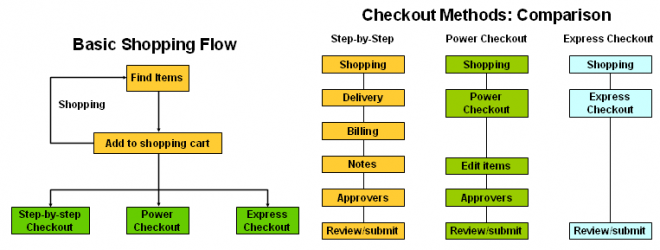
Checkout Methods: Comparison
From the user perspective the different checkout methods dictate the amount of information that requesters must enter to complete an order. From the implementation perspective the methods differ in how much help entering information you expect the requester to require. For example, power checkout provides the same access to requisition information as step-by-step, but does so in fewer pages.
Step-by-Step Checkout
Requesters are led step-by-step through entering the details needed to create an order. Requester needs less experience to complete the order process. Defaults details from requester's My Profile, which the requester can override Requires the Review/Submit step
This checkout method is ideal for the requester who needs complete control over the information to be included in the final requisition.
During the delivery stage specify: Date you want it delivered, Requester Location to deliver to ,Different delivery information for each line item, A one-time address
During the billing stage specify: Procurement card, Taxable status, Project to bill to,
Different billing information foreach line item, Multiple charge accounts for a single line item
During the notes stage specify: Description for the requisition, Notes to the buyer and approver, Attachments
During the approval stage specify: Review your list of approvers, Specify additional approvers, Change first approver, Delete non-mandatory approver, Add note to approver Attach justification attachment
Power checkout
Power checkout is used by requesters with more experience with iProcurement, but that still need to have full control over content. Defaults details from requester's My Profile, which the requester can override Enables updates to checkout information on a single page Requires Review/Submit step.
You can enter or update all the information on a single page during the power checkout process. You can review and edit approvers similar to the step-by-step checkout process.
Express checkout limits what you can update during checkout
Defaults all details from the requester's My Profile Requester can enter only:- Need-by date
- Requisition description
- Notes to buyer and approvers
- Review is optional
To change any of the defaulted information, you will have to use your browser’s back button and use the step-by-step checkout process.
Review/Submit
You may review your requisition before submitting it for approval. You are actually submitting the requisition to the Requisition Approval workflow. If your requisition is approved it will then be submitted to the PO Create Documents workflow to create an order for the supplier.
Internally Sourced Requisitions Overview
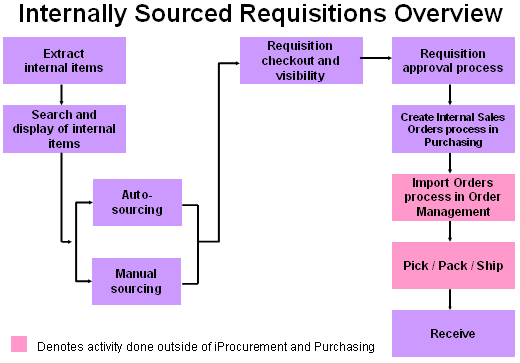
The internal requisitions feature introduced in Oracle iProcurement generally follows the same flow as the internal requisition flow Oracle Applications, with some exceptions.
Extract Internal Items
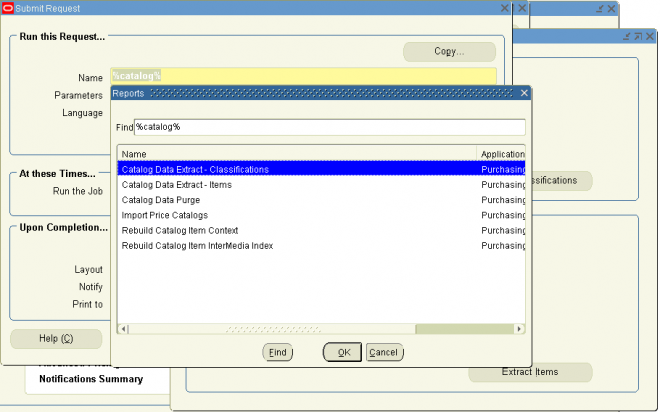
In iProcurement, the process begins once the internally orderable items have been extracted into the catalog. Using the extractor is the only way to get the internal items into the unified catalog.
Search and Display of Internal Items
After searching for items in the catalog, internally orderable items can be viewed and selected. At this point the user may have the option to manually select and/or modify the source information, if the POR: Allow Manual Selection of Source is set to Yes. Alternatively, the iProcurement user can decide to let the application decide which organization or supplier should supply the item(s) selected.
Sourcing and Checkout
Once the user selects an item for internally sourced lines the sourcing logic is triggered (the source organization and, optionally, the source subinventory are determined). During checkout, the existing validations are performed as well as additional validations for the internally sourced line items. At the end of the checkout process an internal requisition line will have been created.
Requisition Approval and Sales Order Creation
Next, the normal requisition approval processes are performed, after which the internal requisition lines are converted into internal sales orders through the two processes Create Internal Sales Orders in Oracle Purchasing and Import Orders in Oracle Order Management. The resulting internal order is then picked, packed and shipped.
Receive
The associated internal requisition line can then be received in iProcurement.
Visibility
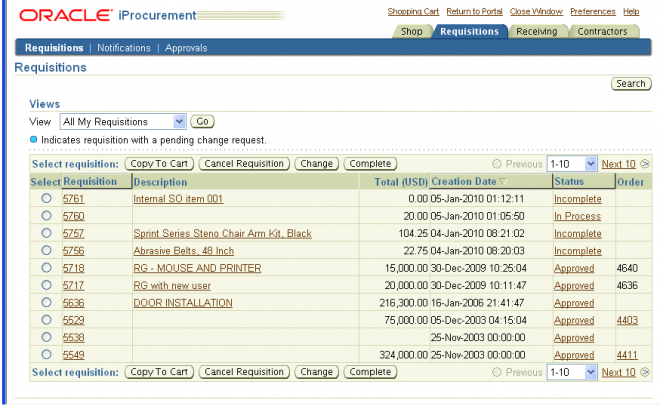
Throughout this process, the internal requisition can be viewed and various information pertaining to the associated internal sales order can be viewed by clicking the internal requisition number from the Requisition Status page and then click the View link associated with the internally sourced line from the View Requisition Details page. If available the Order number, Order Creation Date, and Shipment Number are displayed.
Internally Sourced Requisitions - Details
The internally orderable items are extracted from core applications using the item extractor. The extractor has been enhanced to consider items that have the internal orders enabled flag set to Yes for extraction. Such items may also be externally purchasable, but they need not be. Therefore, items in the catalog may be strictly purchasable (internal orders enabled in the Master Item window is set to No), strictly internally orderable (purchasable in the Master Item window is set to No) or both purchasable and internally orderable (purchasable and internal orders enabled in the Master Item window is set to Yes).
Item Attributes in Source Organization
The following attributes must be set for the item in each organization, in order for those organizations to be considered as source organizations: - Purchasable
- Transactable
- Shippable
- OE Transactable
- Inventory
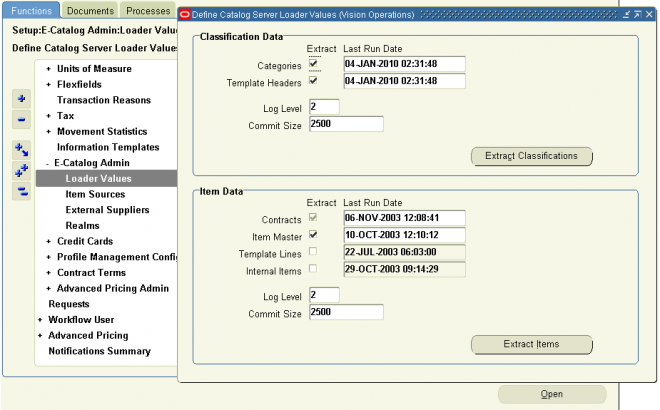
Loader Values Parameters
The extractor also looks at the value of a new loader parameter when determining whether to extract internal items. This new loader parameter is called Internal Items. If checked, then internally orderable items will be loaded into the catalog during the extraction process.
Internally orderable items can be found on requisition templates as well. These internal items will also be extracted, although the source defined on the associated requisition template will not be recorded. Lastly, internally orderable items can be added to a requester’s favorites list. Again, no source information is maintained on the favorites list.
Search and Display of Internal Items
Internally orderable items can be distinguished by the select source link found in the new Stocked Internally on the Search Results page. The select source link is also found as field in the Compare Results and Item Details pages. Internally orderable items can only be distinguished through this field.
Profiles That Affect Internally Sourced Items
The display of Internally orderable items is controlled by 2 profiles:- PO: Legal Requisition Type Profile: Controls whether internally orderable items display on the Search Results page and whether internal requisitions can be created in Oracle Purchasing.
- POR: Allow Manual Selection of Source: Controls whether the select source link displays. By clicking on the select source link, the user can manually select and override the system defaulted source information for a given item. Therefore, this profile controls both the ability to distinguish which items are internally orderable and the ability to manually select the source information.
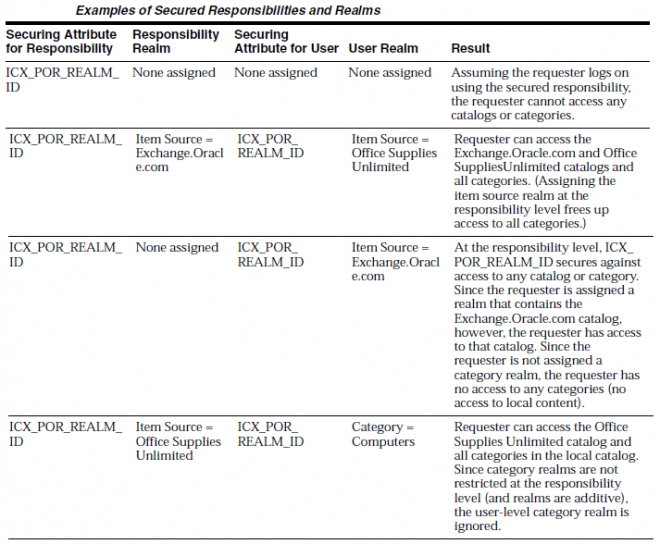
Defining Realms
A realm is a set of access privileges to internal catalogs, external catalogs, or categories within internal catalogs. A security realm is a list of objects (item source or a category) to which a user is granted access. Examples of item sources include a company’s internal catalog or an external supplier’s catalog or marketplace. A category, unlike an item source, represents a grouping of items within the internal catalog.
You can create the following two kinds of realms:
■ A category realm is a set of access privileges to categories contained in the localcatalog.
■ An item source realm is a set of access privileges to punchout, transparent punchout, or informational catalogs.
Once you create a realm, you assign it to a responsibility or user. The requester associated with that responsibility or user can see whatever categories or item source catalogs are contained in that realm.
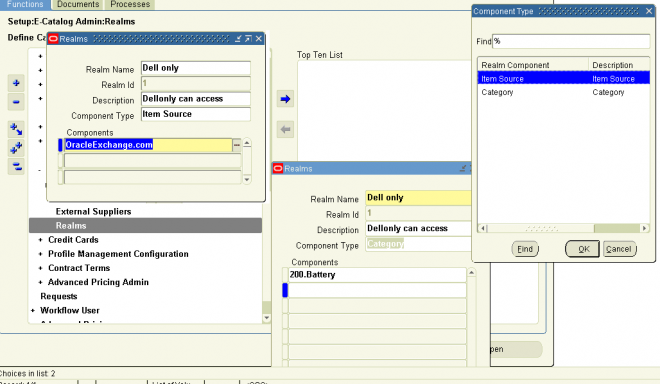
Note: You can use realms either to control access to categories in the local catalog (using category realms) or to control access to a punchout, transparent punchout, or informational catalog (using item source realms). For example, you cannot restrict a user’s access to categories within a punchout or transparent punchout. You cannot use realms to control access to an entire local catalog.
Category Realms Example
Assume the following item categories exist in the local catalog:
■ Medical/Surgical Equipment
■ Medical/Surgical Supplies
■ Notepads
■ Writing Instruments
Because of the nature of the items contained in the Medical/Surgical categories, only certain requesters are allowed to create requisitions for these items. You create two realms. One realm grants access to all of the categories mentioned above and is assigned to the iProcurement MedSurge responsibility. The other realm grants access only to the Notepads and Writing Instruments categories and is assigned to the Internet Procurement responsibility.
Any requester who logs in using the iProcurement MedSurge responsibility has access to items in all of the categories mentioned above. A requester who logs in using the Internet Procurement responsibility has access only to items in the
Notepads and Writing Instruments categories. Alternatively, or additionally, you could assign these realms to individual users.
Item Source Realms Example
Assume the following remote catalogs are defined in Oracle iProcurement:
■ Exchange.Oracle.com (transparent punchout)
■ Office Supplies Unlimited (transparent punchout)
■ Computer Components Corporation (punchout site)
Company policy limits the purchasing of computer hardware to the Information Technology (IT) department. To adhere to this policy and restrict certain requesters from ordering these types of items, two realms are created. One realm grants access to all of the remote catalogs mentioned above and is assigned to members of the IT department. The other realm grants access only to Exchange.Oracle.com and Office Supplies Unlimited. This realm is assigned to all other requesters. You can assign the realms to a responsibility (which assigns it to all requesters who use that responsibility), to individual requesters, or both.
Responsibility and User Access to Realms
Until you assign realms, users have access to all categories and to all punchout, transparent punchout, and informational catalogs defined in Oracle iProcurement.Once you assign a realm, the affected requester or requesters have access only to the data in the assigned realm.
Realms are additive. For example, when you assign a realm to a responsibility, all requesters assigned that responsibility have access to that realm; however, you can assign additional realms to any of these individual requesters that only they have
access to.
Setting up realms consists of three basic steps:
1. Create the realm.
2. Assign the realm to a responsibility.
3. Optionally assign realms to individual users if desired.
To use realms, you must at a minimum "secure" the responsibility that the requesters use to access Oracle iProcurement. Securing a responsibility consists of entering ICX_POR_REALM_ID in the Name field for the responsibility as described
in the steps below. Next, as described in the steps below, assign a realm ID to that responsibility, to requesters (users) in that responsibility, or both, as your needs require.
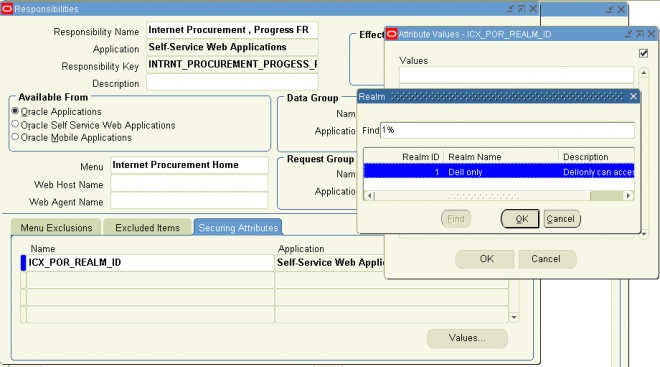
If you secure a responsibility with ICX_POR_REALM_ID and do not assign a realm ID, the responsibility is "secured" against accessing any categories or item source catalogs. Anyone assigned to that responsibility does not have access to any
categories or item source catalogs—until you assign a realm ID to the responsibility or user.
Notes
Categories restricted by realms display to requesters when browsing categories; however, the items in those categories do not display. Category realms restrict access to items in the excluded categories.
A list of non catalog templates in an operating unit
A list of non catalog templates in an operating unit.
Associated item category and stores
Select DISTINCT b.category_id, a.template_name, b.item_type, b.unit_of_measure_code, b.org_id,
c.segment1 ||'.' || c.segment2 ||'.' || c.segment3 ||'.' || c.segment4 ||'.' || c.segment5 AS CATEGORY_VALUE, c.DESCRIPTION
from apps. POR_NONCAT_TEMPLATES_ALL_TL a,
apps. POR_NONCAT_TEMPLATES_ALL_B b,
apps. MTL_CATEGORIES_V c,
apps. ICX_CAT_STORE_ORG_ASSIGNMENTS d,
apps. ICX_CAT_STORES_TL e
WHERE a.template_id=b.template_id
AND b.org_id=d.org_id
AND b.org_id= :org_id
AND a.created_by=b.created_by
AND b.category_id=c.category_id
Tree & Tree Structure
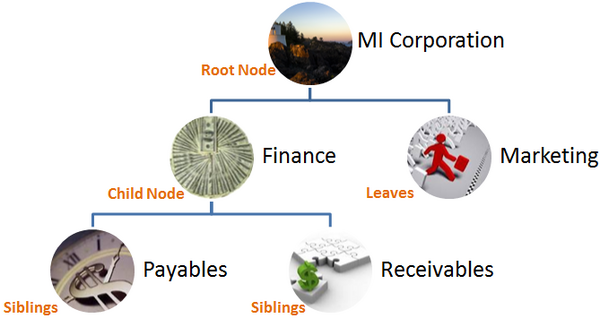
What is a tree?
A tree is hierarchical structures that enable several data management functions such as better access control, application of business rules at various levels of hierarchies, improved query performance, and so on.
This concept is similar to the organization hierarchy in 11i & R12.
For example, MI Corporation has two departments: Marketing and Finance.
The Finance department has two functional divisions: Receivables and Payables.
Defining a tree for the MI Corporation establishes a hierarchy between the organization and its departments, and between the departments and their respective functional divisions as shown in above pic.
What is a tree Structure?
A tree structure is configuration on the basis of which trees are created. It defines and restricts the tree. A tree is an instance of the hierarchy as defined in the tree structure. Tree structures enable you to enforce business rules to which the data must adhere.
The root node is the topmost node of a tree. Child nodes report to the root node. Child nodes at the same level, which report to a common parent node, are called siblings. Leaves are details branching off from a node but not extending further down the tree hierarchy.
Important Points
- You can associate multiple data sources with a tree structure.
- Every tree structure can contain one or more trees.
- You can create tree structures specific to an application but you can share tree structures across applications.
- If you apply version control to the tree structure, it is carried over to the trees that are based on the tree structure.
- Each tree version contains at least one root node. Occasionally, a tree version may have more than one root node.
- An administrator controls the access to tree structures through a set of rules that are periodically audited for validity.
What is a tree version
A tree is created having only one version. However, users can create more than one tree version depending on the need, and they can make changes to those versions. Depending on varying requirements, users can create one or more tree versions and publish all of them or some of them by making the versions active at the same time. Similar to any other version control system, versions of trees are maintained to keep track of all the changes that a tree undergoes in its life cycle.
What are tree labels
Tree labels are short names associated with trees and tree structures and point directly to the data source. Tree labels are automatically assigned to the tree nodes. You can store labels in any table and register the label data source with the tree structure.