E-Business Tax Setup Steps
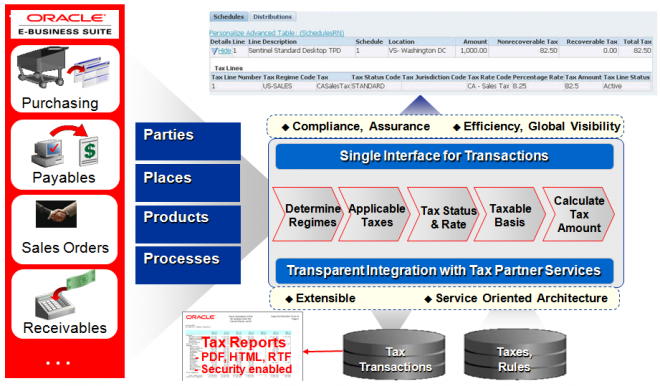
E-Business Tax to set up and maintain your transaction tax requirements in all geographic locations where you do business. You can set up tax configurations to include the rules, default values, and other information necessary for each separate tax requirement. At transaction time, E-Business Tax uses your tax configuration to determine the taxes that apply to each transaction and to calculate the tax amounts.
The tasks involved in setting up a tax requirement in E-Business Tax fall into three general categories:
1. Setting up transaction taxes.
2. Completing all of the setups and settings related to the processing of taxes on transactions.
3. Setting up tax rules and defaults to manage tax processing.
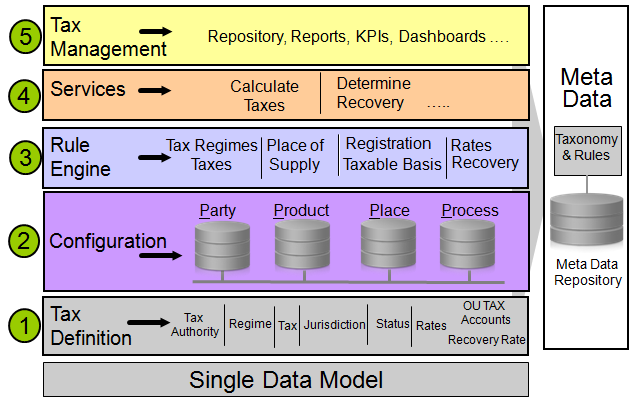
Tax Authority
“A government entity that regulates tax law, administers, or audits one or more taxes”.
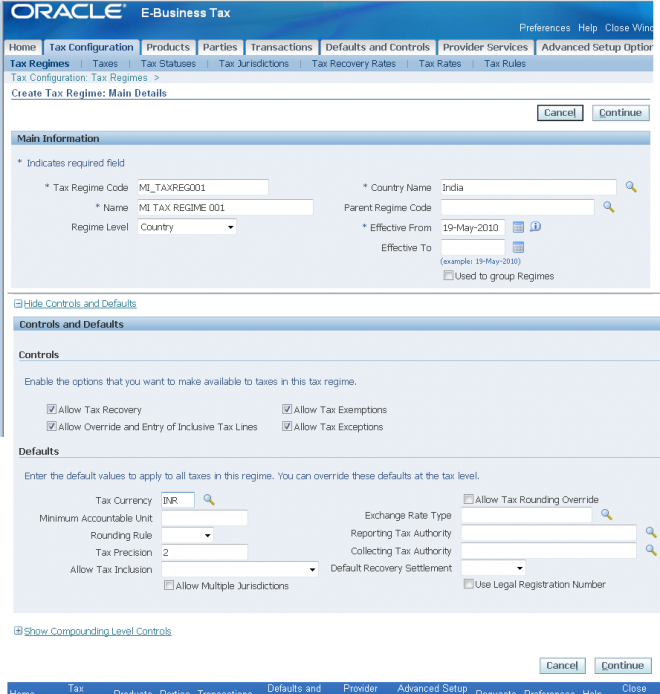
Tax Regime
“The set of tax regulations that determine the treatment of one or more taxes administered by a tax authority”
Examples of a tax regime include:
- A sales and use tax in the United States includes rules for state, county, and city sales and use taxes.
- An excise tax regime in India includes rules for excise tax and additional excise tax.
- A VAT tax regime in Argentina includes rules for standard VAT, additional VAT, and perception VAT.
Example in UG, in Argentina there is a tax similar to European VAT called Impuesto al Valor Agregado (IVA). There is another tax called Impuesto al Valor Agregado Adicional, levied on unregistered customers. These two charges are together commonly referred to as IVA. However, in your tax configuration you define these charges as two
different taxes under the one tax regime called, for example, IVA-Argentina. This configuration specifies that a company may charge two taxes--IVA and IVA Adicional--but these two charges are levied by the same tax authority and the company receives only one tax registration for both taxes. In the example above, you define the IVA-Argentina tax regime to contain the taxes IVA and IVA Adicional. You can then define the tax registrations that your company, customers, and suppliers have for this tax regime, instead of defining tax registrations for the individual taxes.
Thus, although UK VAT, French TVA, and Argentine IVA are all value added taxes, you define each as a separate tax regime with one or more taxes under each regime for the applicable country.
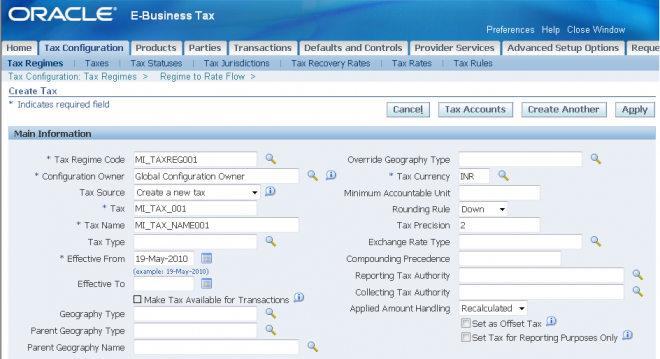
Tax
“A distinct charge imposed through a fiscal or tax authority”
Examples of a tax include VAT for the United Kingdom and TVA for France.
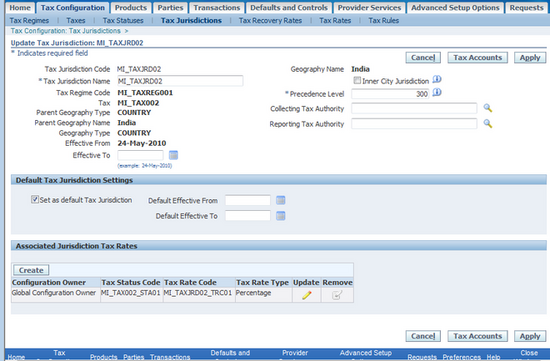
Tax Jurisdiction
“A geographical area where a tax is levied by a specific tax authority or where a specific tax rate applies”
A tax jurisdiction is limited by a geographical boundary that encloses a contiguous political or administrative area, most commonly the borders of a country. For example, the countries of UK, France and Argentina serve as the respective tax jurisdictions for their VAT tax regimes and related taxes.
Often this contiguous political or administrative area falls within a country, such as a state, province, city or a county tax jurisdiction; examples include US state sales tax and Canadian Provincial Sales Tax (PST). In countries where you define tax jurisdictions at a level lower than the country level , you typically need to define tax registrations for your company or your third parties at the level of tax jurisdictions. You can define a tax registration, for example, either to capture a tax registration number or to specify nexus for a supplier in a particular tax jurisdiction.
Examples of tax jurisdictions include:
- The tax jurisdiction for VAT in Germany is the country of Germany.
- The tax jurisdiction for a San Jose city tax is the City of San Jose, California.
- The tax jurisdiction for Provincial Goods and Services tax (PST) in Canada is a particular Province, such as Ontario or British Columbia.
Tax Status
“The taxable nature of a product or service in the context of a transaction for a tax type”
Examples of a tax status include taxable standard rate, zero rated, exempt, and non-taxable. A tax status is similar to the concept of the tax type definition used within Payables and receivables in releases prior to Release12.
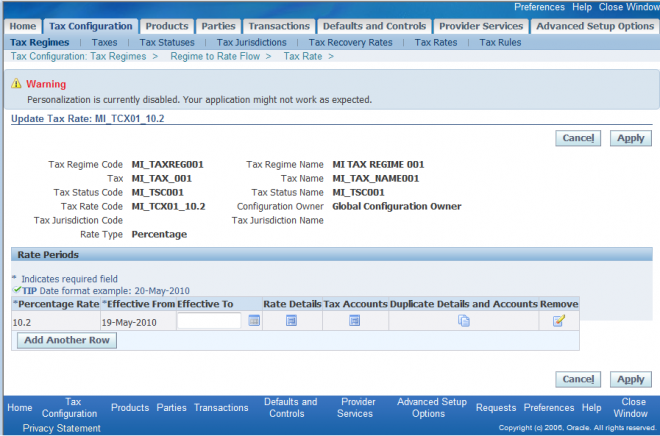
Tax Rate
“The rate specified for a tax status in effect for a period of time. You can express the tax rate as a percentage or as a value per unit quantity”
An example of a tax rate is 7.5% for a state sales and use tax.
Defining Recovery Types and Recovery Rates
In some tax regimes, a tax that is paid by a registered establishment can claim back all or part of taxes due from the tax authority. In E-Business Tax this is called tax recovery. There are usually many regulations surrounding the details of tax recovery. Typically only a portion of the tax amount paid is recoverable, and tax authorities designate the
tax recovery rates that indicate the extent of recovery for a specific tax.
In Canada, two types of recovery possible on Goods and Services Tax (GST). Certain types of establishment can claim both an Input Tax Credit and a Tax Rebate. Both of these types of recovery will have one or more recovery rates applicable under different transaction conditions. E-Business Tax defines these two recovery types as primary and secondary recovery types. For the primary recovery type (and, in rare cases, the secondary recovery type), you can define one or more recovery rate codes with values between 0% to 100%. Like a tax rate code, the recovery rate code can have different rates for different effective periods
Operating Unit Tax Accounts
The tax accounts that the system uses to post the tax amounts derived from your transactions.
The tax accounts you define serve as default accounting information for taxes, tax rates, tax jurisdictions, and tax recovery rates.
Processing Taxes on Transactions
 After you set up the basic tax configuration for the taxes that your company's legal entities and operating units are subject to, you must decide how to automate the processing of taxes on your transactions.
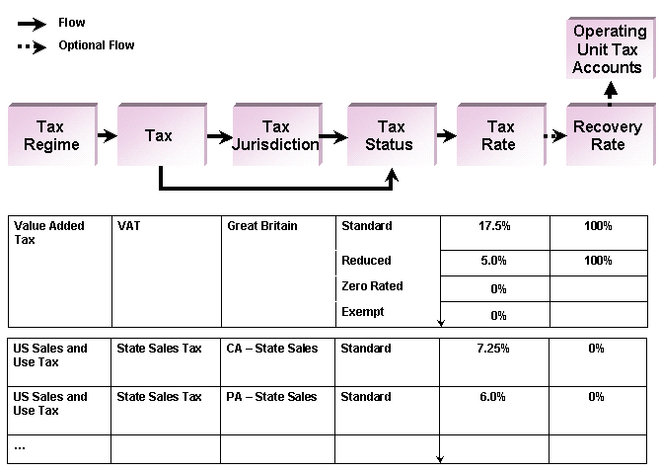
The tax determination process derives the taxes that apply to a transaction and the tax amounts charged on the transaction by evaluating the factors of the transaction according to the rules that you define. These taxability factors are:
Party - The parties of the transaction. This can include:
First party legal entities.
Ship from/ship to parties; bill from/bill to parties.
Tax registrations and registration statuses of each party.
Type or classification of a party.
Product - The products transacted. This can include:
Designation of physical goods or services.
Type or classification of a product.
Place - The places involved in the transaction, including the ship from and ship to locations, and the bill from and bill to locations.
Process - The kind of transaction that takes place. This can include:
Procure to Pay transactions, such as purchases, prepayments, and requisitions.
Order to Cash transactions, such as sales, credit memos, and debit memos.
Type of sale or purchase: retail goods, manufactured goods, intellectual property, resales.
Use these factors to develop your tax determination process and translate your operational procedures into tax rules.